To support future features, it is necessary to update all Cisco 8851 phones to a consistent firmware version. For some users, this will result in a change to the familiar line selection behaviour. However, this behaviour can now be configured individually through the VoIP Service Portal.
Changes with the Firmware Update
For users who have received a new Cisco 8851 phone within the last five years, nothing will change as a result of the firmware update. These devices already run newer firmware and exhibit the behaviour described below. Newer devices can be identified by a sticker on the back of the phone, for example, stating “SW must be 12.6 or later” or specifying a higher version number.
For all other users, the upcoming firmware update may change how phone lines are selected.
Previous behaviour: On a phone with multiple phone numbers, selecting a line, such as line 2, would keep that line selected even after ending a call. Subsequent calls could therefore be made using the same line without having to select it again.
New behaviour: Cisco has changed this behaviour in newer firmware versions. After a call ends, the phone automatically switches back to the first line (primary line). To make the next call using a different line, that line must be selected again.
Restoring the Previous Behaviour
Users who prefer to keep the last selected phone line active can now configure this themselves using the new Phone Settings in the VoIP Service Portal.
To do so, enable “Geräteumkonfiguration aktivieren” (Enable Device Reconfiguration) and then activate “Zuletzt ausgewählte Leitung beibehalten” (Keep Last Selected Line). Click “Speichern” (Save) to apply the change to the phone. The setting will also be applied automatically each time the phone logs in.
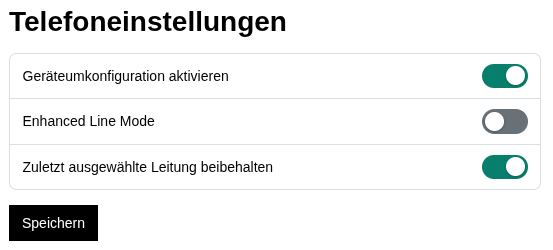
Important: This setting is not compatible with “Enhanced Line Mode”, which enables the buttons on the right-hand side of the phone’s display. Enhanced Line Mode must therefore be disabled.
We generally advise against enabling Enhanced Line Mode, as it significantly changes how the phone operates compared to the familiar standard line mode. We do not provide support for this operating mode.
Users who are already satisfied with the new behaviour do not need to make any changes.
Leave a Reply
You must be logged in to post a comment.