
We implemented the measures described here on September 14, 2026.
Perhaps you’ve already experienced this: You receive an email supposedly from the Examinations Office, the Human Resources Department, or postmaster@tu-chemnitz.de—but it’s actually a scam. Technically speaking, creating such a fake email is, unfortunately, alarmingly easy. Starting September 14, 2026, we’ll make it much harder to do so.
The Most Important Points in 30 Seconds
- What’s happening? Going forward, we’ll instruct other email providers to reject emails that only appear to come from tu-chemnitz.de (DMARC “reject” policy).
- Starting when? September 14, 2026
- What do you need to do? In the vast majority of cases, you don’t need to do anything. Email inbox, webmail, Outlook, Thunderbird, cell phone—everything will continue to work as usual.
- Who should check this? Anyone who has entered their TU email address as the sender in an external service—for example, in conference systems, survey tools, newsletter tools, on external servers, or with private email providers.
- Who should I contact if I have questions or problems? postmaster@tu-chemnitz.de
Why We Do This
Email is over 40 years old, and you can tell by the way it works. The protocol behind it (SMTP) was designed at a time when everyone involved in the Internet still knew each other personally. That’s why entering a sender address that doesn’t belong to you is still about as difficult as writing a false name on an envelope.
Two types of abuse take advantage of this:
- Mass mailing of unsolicited messages — dangerous, fraudulent, or simply misleading.
- Fake sender addresses — in our case, addresses from Chemnitz University of Technology—used to conceal the true origin or to harm the university.
Two figures clearly illustrate what our mail servers have to handle every day:
On a typical workday, our mail servers receive up to 20,000 emails from the Internet—and reject up to 200,000 as spam. This means that for every email delivered, there are sometimes about ten that are rejected.
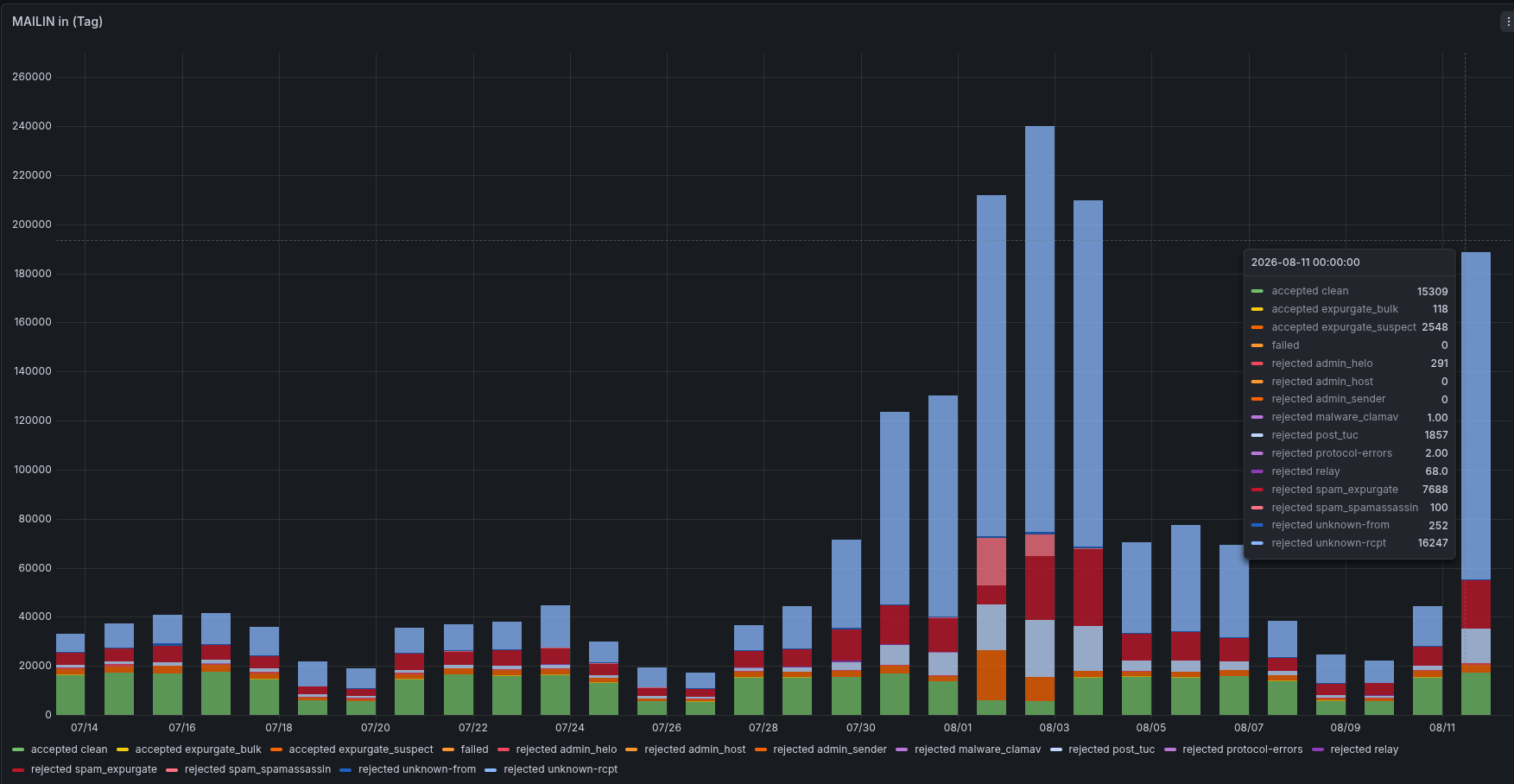
The defense filters are already active on our incoming server. We’ve described exactly what these are in detail under “Automatic Protection Filters for Emails.” However, these filters cannot prevent someone from sending an email from a server anywhere in the world with a tu-chemnitz.de address as the sender. That’s exactly where the planned change comes in.
What’s Changing on September 14, 2026—A Peek in the Mailbox
An email works just like a business letter. It has a letterhead—sender, recipient, subject line, logo—and an envelope that lists the sender and recipient again. It is delivered solely based on the information on the envelope. The postal service isn’t interested in what’s on the letterhead.
In email, the letterhead is called the “From” header (what your email program displays), and the envelope is called the “Envelope-From.” Because both can be forged separately, scammers do exactly that. We explain this in more detail in our FAQ: “Why am I receiving an email even though my own address isn’t in the email header at all?”
There are three methods we have long been using to address this fundamental problem:
| Method | What it Does | Illustration |
|---|---|---|
| SPF | Specifies which servers are allowed to send email with a “tu-chemnitz.de” sender address. | The list of post offices that serve our area. |
| DKIM | Our servers add a cryptographic signature to every outgoing email. | A tamper-proof seal on the letter. |
| DMARC | Tells all other email providers what to do if the list and seal don’t match. | House Rules for the Recipient. |
DMARC, the “house rules,” has been set to “none” so far—“please take note, but feel free to deliver.” Starting September 14, 2026, it will be set to “reject”—“please do not accept at all.”
Here’s an example: Someone sends an email with the sender address postmaster@tu-chemnitz.de via a third-party server without a valid certificate. Until now, this email would likely have ended up in the recipient’s inbox or spam folder. In the future, it will be rejected directly by the receiving mail server—the forged email will never reach its destination.
If, on the other hand, a genuine email from us is simply forwarded and the DKIM signature remains intact, it is still considered genuine and will be delivered. This is precisely why we laid the groundwork back in July 2026 and introduced the SRS (Sender Rewriting Scheme) process: When emails are forwarded from TU to the Internet, we replace the envelope address so that the validation checks on the recipient’s end remain valid.
There is a second change in the opposite direction: For emails received from the Internet, we will no longer accept sender addresses ending in tu-chemnitz.de. In the past, this was a common trick used to mislead recipients. A TU address is still permitted in the letterhead – this is legitimate in the case of forwarded emails and mailing lists. However, we will no longer accept important functional addresses from the TU there either, because these were also used for fraud.
⚠️ The Most Important Point: Where Is Your TU Email Address Listed As the Sender?
| Your Situation | What happens | What you have to do |
|---|---|---|
| You write emails using webmail, Outlook, Thunderbird, or a mobile app | Everything remains the same | Nothing |
| They send emails through a web application on an internal server at TU | Everything remains the same | Nothing |
| You have your TU emails automatically forwarded to a personal email address (Gmail, GMX, etc.) | Still working – thanks to DKIM and SRS | Nothing |
| You are writing to or about a Chemnitz University of Technology mailing list | Still running | Nothing |
| You have set your TU email address as the sender in an external service. | ⚠️ These emails will be rejected in the future. | Check now and make the switch. |
| You operate your own external server that sends emails using the “TU-Absender” address. | ⚠️ Will be rejected. | Contact us, and we’ll work together to find a solution. |
| You are subscribed to external mailing lists using your TU email address. | It’s possible that some posts might get stuck | Report any abnormalities. |
Many services send emails with your address in the “From” field, even though they are not affiliated with TU. Starting September 14, such messages will be rejected by recipients. Please take a moment to review this list:
- Conference and review systems: EasyChair, ConfTool, OpenConf, and others often send invitations and requests for reviews using the program committee’s email address—that is, yours.
- Survey and invitation tools: external survey tools, scheduling, and event registration.
- External newsletter and email distribution services for projects, conferences, or institutes.
- Private email providers where you have set up your TU email address as the sender’s identity so that you can write “on behalf of the TU.”
If you use a service like this, you essentially have three options:
- Have the emails sent via the Chemnitz University of Technology’s mail servers – then everything works automatically.
- Use a different sender address that the respective service can authenticate itself (you can still enter your TU email address as the “Reply-To” address).
- Please contact us. For valid use cases, we’ll work together to find a solution: postmaster@tu-chemnitz.de.
It’s best to respond before September 14. If you don’t, it’s not the end of the world – the email won’t get lost, but it will bounce back with an error message. Still, no one likes email errors the day before a deadline.
In such cases, error messages for rejected emails typically include a note such as 550 5.7.26 along with the keyword DMARC or “unauthenticated email.”
If you see something like this, simply forward the entire error message to postmaster@tu-chemnitz.de, and we’ll look into it.
What Else You Can Do Yourself
Technology alone isn’t enough. There are three things you can do to help yourself and everyone else:
1. Forward suspicious emails to us: Even the best filters let some things slip through. Your reports are our most valuable source for strengthening protection for everyone. The only important thing is that the email arrives in its entirety, including all headers. We provide instructions for all common email programs in the blog post “How to Forward an Email in Its Entirety”.
2. Digitally sign your own emails: With a personal certificate, recipients can verify that a message is truly from you, and you, in turn, can tell if something is wrong with a signed email. You can find more information on our website under “Personal Certificates (Email Certificates)”.
3. Sort out borderline cases yourself: Not everything is clear-cut. What one person considers annoying advertising, another may see as welcome information. We can’t make clean, centralized decisions about exactly these kinds of cases – a personal filter is the right tool for that. Thunderbird, for example, comes with a self-learning junk/spam filter (instructions available on Mozilla’s website), and you can set up your own filter rules on the central mailbox server.
Schedule
| When | What |
|---|---|
| July 2026 ✅ | SRS introduced – redirects remain valid despite rigorous checks. |
| until 14 September 2026 | Please check whether your TU email address is listed as the sender in external services. |
| 14 September 2026 | The DMARC policy is being changed from ‘none’ to ‘reject’; there will no longer be any TU envelope senders for emails received from the internet. |
| after that | We are monitoring the effects closely and will get in touch if any adjustments are needed. |
If you have any questions or problems, you can contact the URZ email administrators at any time at postmaster@tu-chemnitz.de. It’s better to ask too soon than to lose an important email in limbo.
Leave a Reply
You must be logged in to post a comment.